
Six AI medical scribe platforms cover most of what a clinician needs in 2026: ambient note-taking, dictation, and structured documentation that cuts time spent typing after a session. This guide ranks the best ai medical scribe tools by who they actually fit, not by brand size.
- HealthTalk wins for mental health clinicians who need speech-to-note automation and patient history management, not generic SOAP notes.
- Nuance DAX Copilot fits large hospital systems already running Epic and Nuance infrastructure.
- Freed fits solo practitioners who want a scribe tool running within a day, no IT team required.
- Every AI medical scribe tool in 2026 still needs a clinician to review and sign off the note before it enters the chart.
Why this matters
Documentation time is the single biggest driver of clinician burnout, and it's worse in behavioral health where intake notes, progress notes, and treatment plans run longer than a typical primary care SOAP note. A general-purpose AI medical scribe tool built for physical exams doesn't map cleanly onto a 50-minute therapy session.
HealthTalk built its platform specifically around that gap: clinical speech recognition and note-taking automation for mental health documentation and patient history management, not a bolt-on template for behavioral health inside a general scribe tool. That distinction is why the picks below are split by use case instead of ranked as one leaderboard.
What makes the best AI medical scribe tool
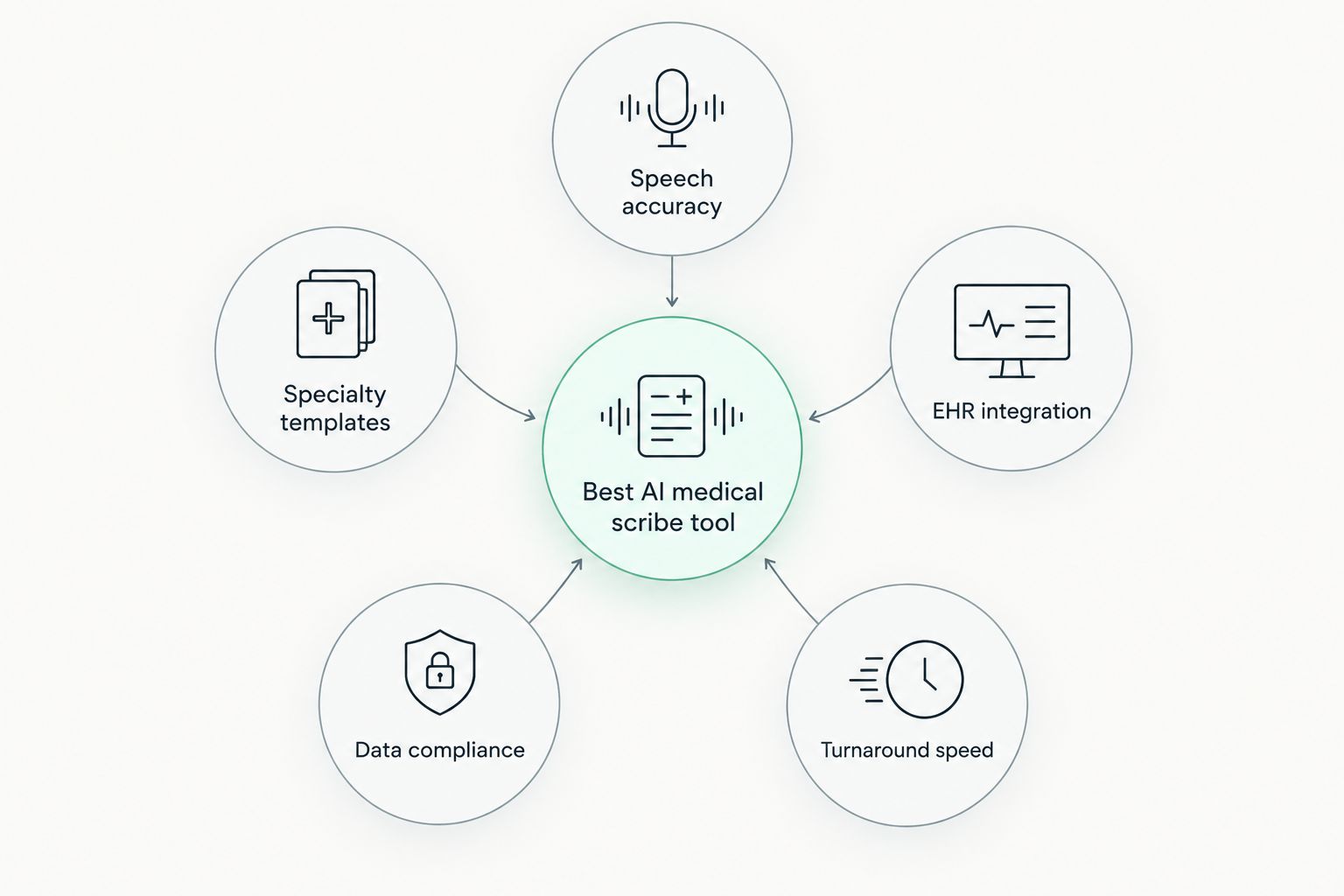
- Speech recognition accuracy in clinical conversations — how well the tool separates clinician and patient speech, handles medical terminology, and manages cross-talk.
- Specialty-specific note templates — whether the tool generates intake notes, progress notes, and treatment plans the way a specialty actually documents, not a generic SOAP format.
- EHR or PMS integration — how the finished note gets into the record system the practice already uses.
- Data security and compliance — HIPAA and GDPR handling for stored audio and transcripts, since clinical conversations are the most sensitive data a practice holds.
- Turnaround time from recording to draft note — minutes matter when a clinician is between sessions with no admin time built in.
AI medical scribe tools at a glance
| Tool | Best for | Standout feature | Key limitation |
|---|---|---|---|
| HealthTalk | Mental health documentation | Patient history automation built for behavioral health | Narrower focus than general multi-specialty scribes |
| Nuance DAX Copilot | Large hospital systems | Deep Epic and Nuance ecosystem integration | Deployment weight suits enterprise systems, not small practices |
| Abridge | Primary and specialty care | Structured note generation from long visits | Templates built around physical-exam visits, not therapy sessions |
| Suki AI | Multi-specialty voice assistant use | Voice commands beyond note-taking, like order entry | General-purpose templates need customization for niche specialties |
| Freed | Solo and small practices | Fast setup with no IT dependency | Fewer enterprise EHR integrations than hospital-grade tools |
| Nabla | Real-time ambient copilot across specialties | Live note drafting during the visit | Not built around behavioral health intake formats |
1. HealthTalk: best AI medical scribe tool for mental health documentation
HealthTalk runs clinical speech recognition and note-taking automation aimed specifically at mental health care professionals, covering documentation and patient history management inside a single workflow. The platform is built around how behavioral health actually documents: intake histories, progress notes, and treatment plans, not the physical-exam SOAP format most scribe tools default to.
HealthTalk pros:
- Documentation structure built for behavioral health rather than adapted from general medicine templates
- Patient history management handled inside the same platform as note generation
- Speech recognition tuned for the pacing and terminology of therapy sessions
HealthTalk cons:
- Focus on mental health means it's not the pick for a multi-specialty practice needing broad coverage
- Practices outside behavioral health will find the templates less relevant
Best for: mental health practices and behavioral health clinics that need documentation built around their workflow, not retrofitted.
Verdict: Buy for any mental health practice still typing progress notes by hand in 2026.
2. Nuance DAX Copilot: best for large hospital systems
Nuance DAX Copilot is Microsoft's ambient documentation product, deployed heavily inside health systems that already run Epic and other Nuance-connected infrastructure. It generates draft notes from ambient audio captured during physician visits.
Nuance DAX Copilot pros:
- Deep integration with Epic and existing Nuance dictation tools
- Backed by enterprise-scale deployment experience across large hospital networks
- Ambient capture reduces the need for a clinician to dictate separately
Nuance DAX Copilot cons:
- Deployment complexity favors large systems with dedicated IT support
- Templates are built around general medical visits, not behavioral health intake formats
Best for: hospital systems and large multi-specialty groups already inside the Nuance or Epic ecosystem.
Verdict: Buy if the health system already runs Nuance or Epic infrastructure; Skip for a small independent practice.
3. Abridge: best for primary and specialty care visit documentation
Abridge focuses on turning long clinical conversations into structured notes for primary care and specialty visits, with an emphasis on capturing the clinical reasoning behind a diagnosis, not just a transcript.
Abridge pros:
- Structured note output tailored to primary and specialty care documentation
- Handles longer, more complex visits without losing structure
- Strong track record with specialty practices outside behavioral health
Abridge cons:
- Note templates are built around physical-exam visits, not therapy session formats
- Less relevant for practices whose documentation is mostly narrative progress notes
Best for: primary care and specialty clinics documenting exam-based visits.
Verdict: Hold for behavioral health practices; Buy for primary and specialty care.
4. Suki AI: best for multi-specialty voice assistant use
Suki AI positions itself as a voice assistant for clinicians, covering note generation alongside voice commands for tasks like order entry and chart navigation across multiple EHR systems.
Suki AI pros:
- Voice commands extend beyond note-taking into other EHR tasks
- Works across a range of specialties and EHR systems
- Useful for clinicians who want voice control of the whole visit workflow, not just documentation
Suki AI cons:
- General-purpose templates require customization for niche specialties like behavioral health
- Broader feature set means more setup than a single-purpose scribe tool
Best for: clinicians who want voice control across documentation and EHR tasks, not just a note generator.
Verdict: Hold — evaluate against a narrower scribe tool if voice commands beyond note-taking aren't a priority.
5. Freed: best for solo and small practice setup speed
Freed targets solo practitioners and small practices that want a scribe tool running fast, without the enterprise deployment overhead of hospital-grade platforms.
Freed pros:
- Fast setup with minimal IT involvement
- Simple pricing model suited to independent clinicians
- No dependency on existing enterprise infrastructure
Freed cons:
- Fewer enterprise EHR integrations than hospital-grade competitors
- Feature set is lighter than platforms built for large systems
Best for: solo practitioners and small practices that need a scribe tool live within days, not months.
Verdict: Buy for solo practices; Hold for multi-location groups needing enterprise integration.
6. Nabla: best for real-time ambient note drafting
Nabla generates draft notes in real time during the visit itself, aiming to hand the clinician a near-complete note the moment the session ends, across a range of specialties.
Nabla pros:
- Real-time drafting shortens the gap between visit end and finished note
- Works across multiple specialties, not locked to one documentation style
- Ambient capture reduces manual dictation
Nabla cons:
- Not built specifically around behavioral health intake and progress note formats
- Real-time drafting still requires a full clinician review pass before signing off
Best for: clinicians who want the note drafted before the patient leaves the room.
Verdict: Hold for behavioral health practices; Buy for specialties where real-time drafting fits the visit structure.
“The best AI medical scribe tool disappears into the visit and hands the clinician a note that matches how they actually document, not a generic template they have to fix.”
How we ranked
Each tool above was placed against the five criteria: speech recognition accuracy, specialty-specific templates, EHR integration, data compliance, and turnaround time. No two tools compete for the same "best for" slot — the table above mirrors that split, and the ranking reflects fit to a use case, not a single overall score.
See HealthTalk for mental health documentation
Automate progress notes and patient history for your practice.
Which AI medical scribe tool should you choose?
A mental health practice documenting intake histories, progress notes, and treatment plans gets more out of HealthTalk than out of a general scribe tool retrofitted for behavioral health. A hospital system already running Epic gets more out of Nuance DAX Copilot. A solo practitioner who needs something running this week gets more out of Freed.
If your practice sits outside those three lanes — multi-specialty groups, real-time drafting needs, voice-command-heavy workflows — Abridge, Suki AI, or Nabla cover those gaps better than a one-size-fits-all pick would. Match the tool to the documentation format your practice actually produces in 2026, not to whichever name shows up first in search results.
FAQ
What is the best AI medical scribe tool for mental health practices in 2026?
HealthTalk is built specifically for mental health documentation and patient history management, covering intake notes and progress notes the way behavioral health practices actually document.
Is Nuance DAX Copilot better than Abridge?
Neither is universally better. Nuance DAX Copilot fits large hospital systems already running Epic and Nuance tools, while Abridge fits primary and specialty care practices documenting exam-based visits.
Do AI medical scribe tools replace clinician review of notes?
No. Every tool listed here produces a draft note that a clinician still reviews and signs off before it enters the patient record.
Which AI medical scribe tool is easiest to set up for a solo practice?
Freed is built for solo and small practice setup speed, with minimal IT involvement compared to enterprise-grade platforms.
Can AI medical scribe tools handle behavioral health intake notes?
Most general scribe tools default to physical-exam SOAP formats. HealthTalk is the tool in this list built around behavioral health intake and progress note formats specifically.
Are AI medical scribe tools HIPAA and GDPR compliant?
Compliance handling varies by vendor and should be confirmed directly with each provider before storing clinical audio or transcripts, since practices remain responsible for how patient data is handled.
What is the difference between an ambient scribe and a dictation tool?
An ambient scribe like Nabla or Nuance DAX Copilot listens to the full visit and drafts a note automatically, while a dictation tool requires the clinician to speak the note content directly.
Do AI medical scribe tools work across multiple EHR systems?
Some, like Suki AI, are built to work across a range of EHR systems, while others integrate more deeply with a single ecosystem such as Epic.
One last thing
The practices getting the most out of an AI medical scribe tool in 2026 are the ones that picked the tool matching their documentation format first, then worried about EHR integration second. A hospital system chasing a solo-practice tool for setup speed ends up rebuilding integrations later; a mental health practice forcing a physical-exam template into a progress note ends up editing more than it saves.